Keep Your Ubuntu Fast and Clean With BleachBit


In order to keep your Ubuntu clean and fast, you need to wipe all unnecessary junk files, internet history, broken short cuts, cookies, temporary files, and cache periodically. To help you, here is a very simple to use tool called BleacBit, which can perform all job just with a click.
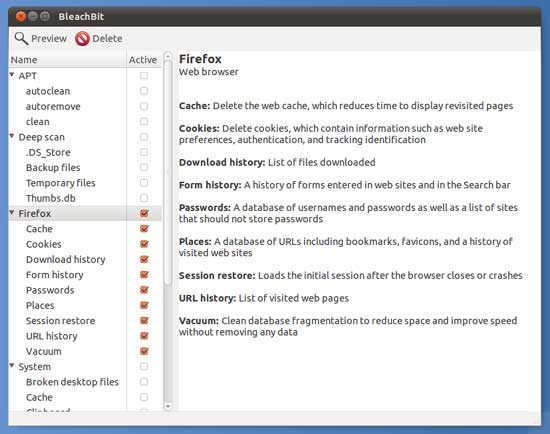
Bleachbit
BleachBit is an open source tool that can delete unnecessary junk files to free valuable disk space and maintains your privacy by removing cache, cookies, and Internet history from your Ubuntu.
Moreover, the File Shredding option helps you permanently wipeout important files from your system, so one can recover it later. Also, the option for vacuuming Firefox makes it load faster.
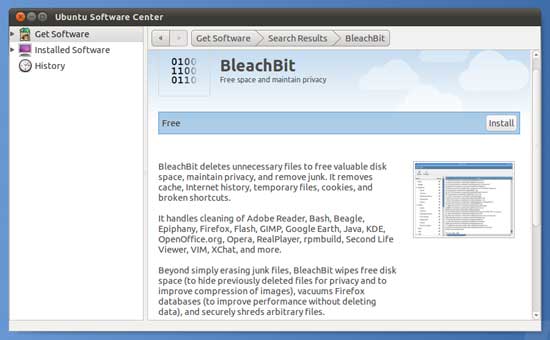
Bleachbit-install
BleachBit is very easy to use. Just download and install it via Ubuntu Software Center. Run and select option, the click Delete button. You’re done!
BleachBit can be downloaded (Linux and Windows) at http://bleachbit.sourceforge.net/download


How to Remove the Latest Web Danger Evercookie


Evercookie is a latest web danger and the usual tools for removing cookies (flash cookies and normal cookies) won’t work on it, because Evercookie stores cookie data in multiple ways, so tracking information can’t be easily deleted. If you are worried more about your privacy, you should think twice of them.
Most people now know about cookies. They are bits of data on your computer that can be used to trace your internet habit, and are often used to remember your login information at websites.
Now the question is how to kill this Evercookie? There is a tool called Anonymizer Nevercookie that claims to kill them, while still letting you keep useful cookies on your hard disk.
Anonymizer Nevercookie is a free Firefox add-on. Install it and launch Firefox.
(Nevercookie is used with private browsing mode, so ‘Choose a user profile’ screen may appear, if you haven’t used Firefox user profile previously).
Then, go to Tools – Start Private Browsing.
A new browser window will open. It will be branded with a blue Navigation Menu bar. Use this window for your private browsing session and without keeping Evercookie.
To leave private browsing mode, close the private browsing window in the parent Firefox window, go to Tools – Stop Private Browsing.

Keep away from fake disk cleanup and defragging utilities


There are several utilities available for download on the internet to improve the performance of your computer like defragging tools, registry cleaners, and disk clean-up utilities. Among them, there are many fake utilities, which look legitimate, so difficult to identify. These fake utilities distribute malware, and cause many problems to users and their computer.
You should be aware of such fake utilities. Symantec has intentionally published a list of software to avoid which includes:
  1. Ultra Defragger
  2. Smart Defragmenter
  3. HDD Defragmenter
  4. System Defragmenter
  5. Disk Defragmenter
  6. Quick Defragmenter
  7. Check Disk
  8. Scan Disk.

Note: Windows comes equipped with a wide range of tools, including ones for disk defragmentation and general disk clean up. Users are best advised to try to use these tools to improve any performance issues they may be experiencing before resorting to third-party tools.

Read : http://www.symantec.com/connect/blogs/fake-disk-cleanup-utilities-ruse